
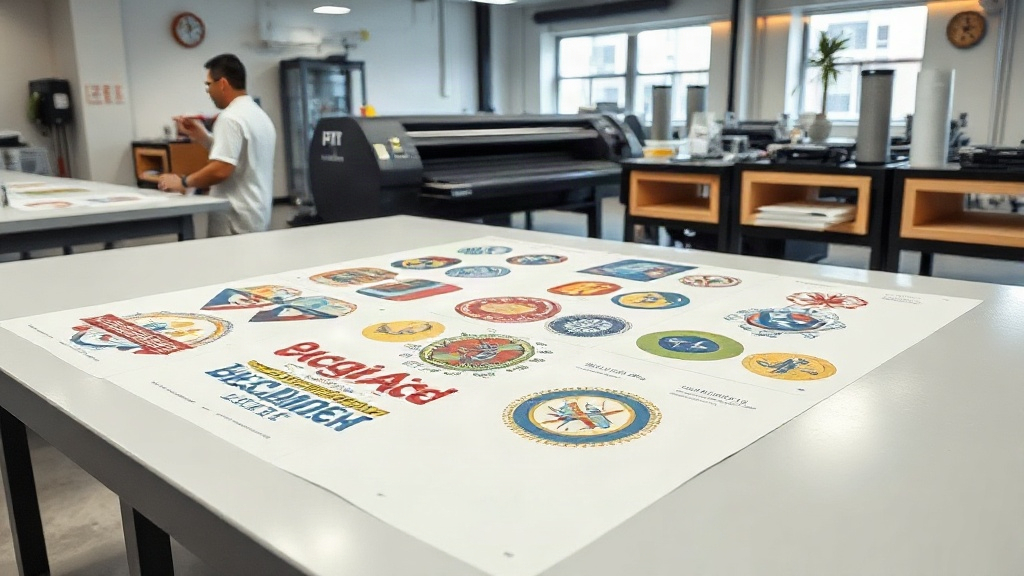
If you're in the custom apparel business, you've likely heard about DTF printing. It's a game-changer for producing vibrant, durable transfers on demand. But did you know that you can take your efficiency to the next level with DTF gangsheets? In this guide, we'll dive deep into what gangsheets are, why they matter, and how you can use them to maximize your profits.
What is a DTF Gangsheet?
A DTF gangsheet is a single sheet of DTF film that contains multiple designs printed together. Instead of printing one design at a time, you arrange several designs on one large sheet, then press them onto garments as needed. This method is called "gang printing" or "gang run," and it's a staple in commercial printing for good reason: it saves time, money, and materials.
Why Use a Gangsheet?
Let's break down the benefits. First, efficiency. Printing multiple designs in one go reduces setup time and labor. Second, cost savings: you use less film, less powder, and less ink per design. Third, consistency: all your transfers come from the same batch, so colors and quality are uniform. If you're running a print shop, these advantages add up quickly.
How to Create a DTF Gangsheet
Creating a gangsheet might sound complex, but with the right approach, it's straightforward. Here's a step-by-step breakdown.
Step 1: Gather Your Designs
Collect all the designs you need to print. They can be different sizes, but keep in mind the width of your DTF printer and film. Common film widths are 13", 17", and 24". You'll want to arrange designs to minimize wasted space.
Step 2: Use Gangsheet Software
While you could manually arrange designs in a graphics program, dedicated gangsheet software or plugins can automate the process. Tools like GangSheet Builder or RIP software often have nesting features that optimize layout. If you're using Adobe Photoshop or Illustrator, you can create a template with guides.
Step 3: Add Registration Marks
Registration marks help you align the film correctly when pressing. They also assist in cutting if you're using a cutter. Most gangsheet software adds these automatically.
Step 4: Print and Cure
Print your gangsheet on DTF film using your DTF printer. Then apply hot melt powder, shake off excess, and cure under heat. Follow your printer and powder manufacturer's recommendations for temperature and time.
Step 5: Press and Peel
When you're ready to apply a design, cut it out from the gangsheet, place it on the garment, and press. The transfer will release from the film, leaving a soft, durable print.
Maximizing Efficiency with Gangsheets
To get the most out of gangsheets, consider these tips:
- Plan your layout: Group designs by size and color to minimize waste.
- Use nesting software: It automatically arranges designs for optimal use of space.
- Print in batches: Combine orders to fill a sheet, reducing idle time.
- Keep a library: Save frequently used gangsheet layouts for quick reprints.
Common Mistakes to Avoid
Even seasoned printers make mistakes. Here are pitfalls to watch for:
- Overcrowding: Leaving too little space between designs can cause cutting errors.
- Inconsistent powdering: Uneven powder leads to poor adhesion. Use a powder shaker for even coverage.
- Incorrect curing: Under-curing causes washing off; over-curing makes the transfer brittle.
- Ignoring film orientation: Always print on the coated side of the film.
DTF Gangsheet vs. Individual Transfers
Is a gangsheet always better? Not necessarily. For very large designs that take up most of a sheet, individual printing might be more practical. But for small to medium designs, gangsheets win on efficiency. Also, if you offer a variety of designs, gangsheets let you produce a mix without switching rolls.
Advanced Tips for Pros
Ready to level up? Try these advanced techniques:
- Color management: Calibrate your printer and use ICC profiles for consistent colors across gangsheets.
- Automated cutting: Invest in a cutter with optical recognition to cut designs from gangsheets automatically.
- Inventory management: Print popular designs in bulk on gangsheets and store them for quick fulfillment.
- Hybrid gangsheets: Combine DTF with other transfer types? Not recommended, but you can mix DTF designs with different sizes.
Frequently Asked Questions
What is the maximum size for a DTF gangsheet?
The maximum size depends on your printer and film width. Common widths are 13", 17", and 24", with lengths limited by your roll. Some printers can handle up to 24" wide and 100 feet long.
Can I reuse a gangsheet?
No, DTF gangsheets are single-use. Once you press a design, the film is spent. However, you can print multiple copies of the same gangsheet layout.
How do I store gangsheets?
Store them in a cool, dry place away from direct sunlight. Keep them flat or rolled loosely to prevent creasing. Use a dust-free bag if possible.
Do I need special powder for gangsheets?
No, the same hot melt powder used for individual DTF transfers works for gangsheets. Just ensure even application.
Can I print gangsheets on a regular inkjet printer?
No, DTF printing requires a DTF printer with DTF inks and film. Regular inkjet printers won't produce the same results.
Mastering DTF gangsheets can significantly boost your production capacity and bottom line. Start small, experiment with layouts, and soon you'll wonder how you ever managed without them. For more tips and high-quality DTF supplies, visit dtfprintgo.com.